Why Wireless Backup Internet for Homes and Businesses is a Game-Changer | RV Internet in Austin | What Antenna Works Best for T-Mobile Home Internet in San Jose? | How Does Skynet Internet Work in Austin?

In today’s world, staying connected isn’t just convenient—it’s essential. Whether you’re working from home, streaming your favorite shows, or managing a small business, you need internet service that actually works when you need it. That’s where cellular home internet comes in as a game-changing solution that’s transforming how people and businesses stay online.

Unlike traditional broadband that depends on physical cables running to your location, cellular home internet uses the same wireless networks that power your smartphone. This means faster setup, greater flexibility, and a reliable backup when your primary connection fails. At RingPlanet, we’ve seen firsthand how this technology helps people maintain connectivity in situations where traditional internet simply can’t deliver.

5G backup internet for tv | Cellular home internet
Telecommunications tower with 4G, 5G transmitters, cellular base station with transmitter antennas on abstract Triangulated Background with icons. Communication Mobile Technology concept. Copy Space

How Cellular Home Internet Works

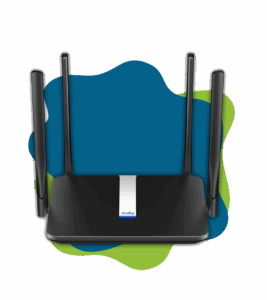
Wireless home internet operates through a simple but powerful setup. A cellular router in your home connects to nearby cell towers, delivering internet access without the need for cable installation or complex infrastructure. The router picks up 4G LTE or 5G signals from carriers and converts them into Wi-Fi that your devices can use.

This approach offers several distinct advantages. Installation takes minutes instead of days or weeks. You’re not locked into a specific location—if you move, your internet moves with you. And because it runs on cellular networks, you can get online in areas where cable or fiber infrastructure doesn’t exist.

The technology has matured significantly in recent years. Modern cellular internet routers deliver speeds comparable to traditional broadband, with many 5G-enabled devices reaching download speeds of 100-300 Mbps. That’s more than enough for video calls, cloud applications, and streaming multiple devices simultaneously.

When Cellular Home Internet Makes the Most Sense

There are specific situations where mobile broadband for home truly shines. Remote workers who travel frequently benefit from portable connectivity available anywhere. Small businesses need backup internet service for business continuity when the primary connection goes down.

We’ve worked with professionals who split time between multiple locations—a weekend home, a city apartment, and temporary workspaces. For these individuals, cellular connectivity means never losing productivity during transitions. One client runs a consulting business and needs reliable access whether working from her downtown office or her mountain retreat.

Emergency preparedness is another critical consideration. Natural disasters, construction accidents, and infrastructure failures can knock out traditional internet for hours or days. Having cellular home internet as a secondary option means staying connected when it matters most.

Comparing Cellular Internet to Traditional Options

Traditional cable and fiber internet excel at delivering high speeds to fixed locations. However, these services require physical infrastructure, lengthy installation processes, and often come with multi-year contracts. If the cable gets cut or the local hub experiences problems, you’re offline until repairs happen.

Satellite internet reaches remote areas but typically suffers from high latency and weather sensitivity. DSL technology depends on aging telephone infrastructure and offers slower speeds the farther you are from the central office.

Cellular solutions fill the gaps these technologies leave. Installation is immediate—plug in the router and you’re online. No technician appointments, no drilling holes in walls, no waiting for service activation. This makes portable internet solutions particularly attractive for temporary housing, business pop-ups, and people testing a neighborhood before committing to a long-term residence.

Real-World Applications for Wireless Internet Service

The flexibility of cellular wireless internet serves diverse needs. Digital nomads use mobile hotspot access to work from coffee shops, co-working spaces, or while traveling between cities. Students in temporary housing avoid complicated internet contracts that don’t align with semester schedules.

Event organizers rely on cellular connections to support on-site operations where venue internet is unreliable or non-existent. Construction site managers need connectivity before permanent infrastructure exists. Food trucks and mobile vendors process payments and manage inventory using wireless networks.

At RingPlanet, we’ve equipped small medical clinics with 5G backup internet ensuring patient records remain accessible even during primary connection outages. Real estate agents conducting open houses use cellular routers to run virtual tours and process applications on-site.

Key Features to Look for in Service Providers

When evaluating home LTE internet providers, several factors determine your experience. Network coverage in your specific area matters most—check that your provider has strong signal strength where you’ll use the service. Speed capabilities should match your usage patterns, with 5G options available for bandwidth-intensive activities.

Data allowances vary significantly between plans. Some providers offer unlimited data while others cap monthly usage. Understanding your typical consumption helps avoid unexpected throttling or overage charges. Contract terms also differ—some services require long commitments while others offer month-to-month flexibility.

Hardware quality impacts performance and reliability. Look for modern routers that support the latest cellular standards and can handle multiple simultaneous connections. Customer support responsiveness becomes crucial when troubleshooting issues or adjusting your service.

Making Cellular Internet Work for Your Situation

Optimizing your wireless internet setup starts with router placement. Position your device near windows or in elevated locations for better signal reception. Avoid placing routers in basements, behind thick walls, or near large metal objects that interfere with cellular signals.

Monitor your data usage, especially during the first month. This helps you understand consumption patterns and choose the right plan. Most modern routers include management apps that track usage in real-time and let you set alerts before reaching monthly limits.

Consider your backup power needs. During outages, cellular broadband continues working as long as your router has power. Battery backup systems or portable power stations keep you connected when the grid goes down—a critical feature for business continuity planning.

The Business Case for Mobile Home Internet

Businesses face unique connectivity challenges that cellular solutions address effectively. Downtime costs money—lost productivity, missed opportunities, and frustrated customers. Having redundant internet connections through different technologies ensures operations continue regardless of which system experiences problems.

Mobile businesses particularly benefit from portable Wi-Fi. Sales teams demonstrating products at client locations, consultants working at different office sites, and service providers operating from vehicles all need reliable internet that travels with them.

Seasonal businesses appreciate the flexibility of cellular plans that scale with demand. A beach rental operation might need robust connectivity during summer months but minimal service off-season. Month-to-month cellular plans accommodate these fluctuating requirements better than annual cable contracts.

Understanding Coverage and Performance Expectations

Cellular internet performance depends heavily on your location relative to cell towers. Urban areas generally offer excellent coverage and speeds, while rural locations may experience more variation. Before committing to service, test coverage using your smartphone on the same carrier network.

The FCC’s broadband coverage maps provide detailed information about wireless internet availability in your specific area. These maps show which carriers offer the strongest signals in your location, helping you make informed decisions about service providers.

Building materials affect signal strength. Concrete, brick, and metal construction can weaken signals compared to wood-frame buildings. If you experience weak signals indoors, external antennas can significantly boost performance by capturing signals more effectively.

Network congestion impacts speeds during peak usage times. Just like highways get crowded during rush hour, cellular networks can slow when many people connect simultaneously. Understanding how 5G technology works helps you set realistic expectations for performance in different environments and choose the right technology tier for your needs.

Frequently Asked Questions About Cellular Home Internet

Is cellular home internet fast enough for working from home?

Yes, modern cellular home internet delivers speeds between 50-300 Mbps depending on whether you’re using 4G LTE or 5G technology. This easily handles video conferencing, cloud applications, file uploads, and multiple devices simultaneously. We’ve supported numerous remote professionals who rely exclusively on wireless connectivity for daily work without performance issues.

Can I use cellular internet if I don’t have good cell phone service?

Cellular home internet uses the same towers and frequencies as mobile phones, so weak phone signal typically means weak internet performance. However, dedicated cellular routers often include better antennas than phones and can pick up signals more effectively. Adding an external antenna can also improve reception significantly in marginal coverage areas.

How does weather affect cellular internet connections?

Unlike satellite internet, cellular connections handle weather quite well. Rain, snow, and clouds have minimal impact on performance since cellular signals operate at frequencies that penetrate weather conditions effectively. Extreme weather events that damage cell towers can affect service, but this is relatively rare and usually restored quickly.

What happens to my cellular internet during a power outage?

Your cellular home internet continues working during power outages as long as your router has power and the cell towers remain operational. Most cell towers have backup power systems that keep broadcasting during grid failures. Using a battery backup or portable power station with your router ensures continuous connectivity even when your home loses power.

Can I take my cellular internet router when I travel?

Yes, that’s one of the major advantages of cellular home internet. The router is portable and works anywhere within your carrier’s coverage area. Whether you’re moving between homes, traveling for extended periods, or working from different locations, your internet connection moves with you, making it ideal for people with multiple residences or frequent travelers.

Moving Forward with Confidence

Choosing the right internet solution depends on understanding your specific needs and how different technologies serve those requirements. Cellular home internet has evolved into a robust, reliable option that complements or even replaces traditional broadband for many situations.

The key is working with a provider who understands both the technology and your unique circumstances. At RingPlanet, we’ve built our reputation on delivering wireless connectivity solutions that actually work for real people and businesses. We don’t just sell routers—we help you design connectivity strategies that keep you online when it matters.

Whether you need a primary connection, backup internet service for business reliability, or portable access for a mobile lifestyle, exploring your cellular internet options is worth the conversation. Contact us to discuss how wireless technology can solve your specific connectivity challenges. Explore our 5G backup internet options to see how we can help you stay connected, productive, and prepared for whatever comes next.